MindReader: Using LLMs to Encourage Memorable and Secure Password Replacement
July 13, 2026
Abstract
We report on the design and evaluation of MindReader, a tool that helps a user replace her password when she is required to do so. Left to their own devices, users tend to replace their previous passwords with predictable variations of the original ones. MindReader leverages LLMs to suggest password variations that are chosen to be easy for the user to remember but harder for an attacker to predict. To do this, MindReader infers the meaning behind original password components and then suggests semantically related (yet syntactically unrelated) components for the new password. In a user study, passwords created using MindReader were more secure than both replacement passwords created without using MindReader and original passwords. In particular, MindReader replacement passwords were harder to guess in an online attack than alternative replacement passwords even by an attacker with knowledge of the original password and full knowledge of the tool implementation. Passwords created with MindReader were also comparably memorable to alternative replacement passwords and original passwords, as measured by the ability of users to successfully log in a week after creating their password.
1 Introduction↩︎
In the context of managing one’s security and privacy, password maintenance is among the most famously difficult cognitive tasks for humans to do well. Even when informed about the leak of their password information, a minority of users change their passwords [1]; if they do, a majority of replacement passwords are weaker than the originals [1]; and few users change their practices to better protect their accounts (e.g., adopt a password manager [2] or enable two-factor authentication [3]). Only providing users with understanding of both the threat and how to change passwords was shown to increase the likelihood that users would do so [4]. It is thus not surprising that when forced to change passwords proactively, to counter the hypothetical possibility that their password information was leaked, users invest little effort to make any changes but the obvious ones (e.g., [5]). As such, users resist changing passwords and, when they do, they choose replacements that are insufficiently different from the originals and therefore are easy to guess with knowledge of the original passwords. Tools like password managers can both store passwords and help create strong passwords; however, they can’t be used in all contexts [6] and aren’t used universally [7], [8], and even in the presence of password managers, users need to create and remember some passwords, like the password to a password manager itself, themselves.
Considering the many ways in which large language models (LLMs) can be useful in performing tasks that humans find cognitively challenging [9], it might seem natural that LLMs could play a useful role in password management, as well. While there have been some initial forays into doing so (see 2 for a discussion of related work), we are aware of none that leverage an LLM’s ability to mimic human lexical organization. Indeed, a recent study using word association [10] showed that modern LLMs model human mental lexicons quite well. The key contribution of this paper is to show how this ability can be leveraged in a tool, called MindReader, to assist a user with the cognitively difficult task of replacing her password.
MindReader helps a user replace her password with a new one that is both memorable and hard for an attacker to guess, even with knowledge of the old password. MindReader works by replacing all elements of the old password with semantically similar but difficult to guess or predict replacements. Starting from the user’s existing password (or her initial attempt for her password), MindReader segments the password and provides a semantic description for each segment. For example, starting from the password “m1ndR3ADER”, the tool might identify segments “mind” and “reader”, explaining these as “The human brain or mental state and awareness” and “A person who reads written content, such as text”, respectively. The tool permits the user to adjust the segments and explanations; e.g., she might delete the segment “reader” and change the segment “mind” to “mindreader”, with the explanation “able to know my thoughts”. Finally, MindReader generates chains of associated segments, combining selected ones into candidate passwords, from which the user can choose (and adjust). The key insight in this technique is that since the user was presumably able to recall her previous password, and because the associations leading to new segments are ones that are likely meaningful to humans, the user can recall the new password almost as easily.
In this paper, we shed light on the key design considerations to realize this approach and how we instantiated these decisions in a working tool. We also compare MindReader to the unguided replacement of passwords via a user study, yielding the following findings:
Memorability: MindReader helps users create replacement passwords that are comparably memorable to both original passwords and their unguided replacements.
Black-box security: MindReader helps users create replacement passwords that are more secure against conventional guessing attacks—ones without knowledge of the password being replaced—than replacement passwords created without MindReader and the original password that is replaced.
White-box Security: MindReader helps users create replacement passwords that are more secure against online attacks designed with knowledge of MindReader than replacement passwords created without MindReader, given an attacker with knowledge of the original password being replaced.
For example, in our user study, we found that passwords created with MindReader were never guessed in online attacks, and only 58% of these passwords were guessed in offline attacks, compared to over 80% of both alternative replacements and original passwords. For an attacker with knowledge of the original password and the design of MindReader, only 3.5% of MindReader passwords were guessed compared to 18% of alternative replacements in an online attack. When users returned to log in, we found no statistically significant difference in the login success rate between users with MindReader passwords and those with alternative replacements or original passwords. Out of our user study participants who used MindReader, over 70% said they would use a password created with it.
The rest of this paper is structured as follows. We discuss related work in 2. We discuss the implementation of MindReader in 3 and the design of our user study in 4. We lay out our methods for the evaluation of MindReader in 5 and go over the results in 6. We discuss the implications of our work and limitations in 7. We conclude our work and discuss ethical considerations in 8 and 9.
2 Related Work↩︎
Helping a user improve the security of her chosen password as she is deciding upon it is a goal that MindReader shares with other systems. Password blocklists and composition policies [11] interfere with the selection of weak passwords; strength meters [12]–[16] and advice/nudges [16]–[18] encourage the selection of stronger ones. The Telepathwords system [19] shows ways that users would often complete a password based on what the user has typed so far, to enable the user to avoid these easily predicted completions. And, most closely related to our work, several techniques detect password structure and advise the user how to strengthen it [12], [20]. MindReader improves upon this last category of system by detecting not only structure but meaning, and then suggesting specific alternatives based on that meaning—e.g., to replace “apple” with “pumpkin” if the user chose the former to mean “an autumn fruit,” but with “touchscreen” if the user chose the former to mean “a consumer electronics company”—instead of generic advice (e.g., “Add an uncommon word” [20]).
To our knowledge, in the context of passwords, LLMs have primarily been studied as a technology to better model the distribution of human-selected passwords, in order to guess such passwords more efficiently (e.g., [21], [22]). Out of the box, LLMs are known to create predictable, low-entropy passwords [23]. Our method avoids this by shuffling segments, using chains of association to find replacement, and adding randomness programmatically, and we evaluate security both against an attacker with knowledge of the tool and its probabilities and one without this knowledge. Li, et al. [24] explored the use of LLMs to generate measurably high-entropy passphrases for users but reported poor (essentially, no) memorability after only three days in user studies; presumably this negative result resulted, in part, from the fact that the passphrases were not informed by the preferences of their participants. In contrast, the method we explore here produced considerably better memorability in our user study, after one week.
More distantly related work focuses on preventing password reuse by the same user at different sites through the use of different password policies [25] or explicitly detecting that reuse [26]. Also distantly related are previous works that have proposed methods to improve how users replace existing passwords by ensuring that the new password is not too syntactically similar to the previous password(s) for the same account, while storing only a representation of the previous password(s) that makes them difficult to recover in the event of a password database breach. For example, Berardi, et al. [27] propose a method that leverages Bloom filters of password \(n\)-grams to strike a balance between breach-resilience and the ability to detect similarity of a new password to previous ones. MindReader is consistent with such solutions but does not require their use. In particular, MindReader does not impose nonstandard methods for storing password information.
Alternative types of passwords have also been explored to generate memorable and secure passwords, including graphical passwords (e.g., [28]–[30]), password shapes for PINs [31], and replacing password recall with word or letter recognition [32]. MindReader is designed specifically for text-based passwords that the user is expected to recall—overwhelmingly the norm today—though extension of its ideas to graphical passwords or other designs is an interesting direction for future work.
3 MindReader Design and Implementation↩︎
In this section, we discuss how MindReader was implemented. We begin by covering the use case of MindReader in 3.1. We then discuss the method used by MindReader to replace passwords in 3.2 and finish by covering the general details of how MindReader was implemented in 3.3.
3.1 Use Case↩︎
A user may use MindReader to change her password when asked or required to do so, potentially in the case of a breach or password expiration, or at will. MindReader is meant to be used to replace passwords by users for whom password memorability is important, i.e., users who, at least in some circumstances, choose to enter their passwords manually rather than copy-pasting or auto-filling their passwords. This could be the case for devices that do not allow password managers [6], password-manager master passwords, or any of the other passwords users choose to enter manually [7]. MindReader helps such a user change her password to one that is syntactically very different by analyzing the previous password and suggesting replacements whose components are semantically related to the components of the original password.
3.2 Replacement Method↩︎
MindReader helps users pick better replacement passwords by replacing all relevant parts of the old password with alternatives that are chosen to be easy to remember but difficult to guess. This process consists of identifying segments of the original password, finding replacement segments for each, and combining new segments into a replacement password. In this section, we describe these steps and illustrate them through screenshots from MindReader. More views of the user interface are shown in 10.1.
3.2.1 Password Segmentation↩︎
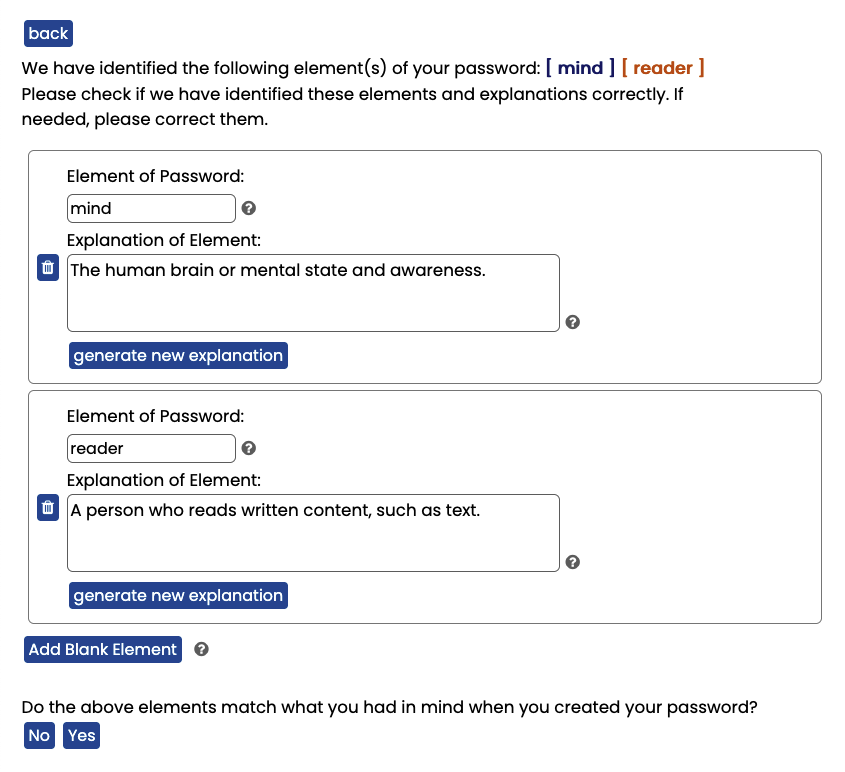
MindReader begins by identifying any segments of the password. To segment the password itself, MindReader uses WordNinja [33]. After piloting our study, we found that it may be useful to attempt to undo any character replacement, such as leetspeak, before segmentation. MindReader uses an LLM to identify whether or not passwords use leetspeak. If so, MindReader uses an LLM to attempt to undo this and recover the underlying string. With this method, for example, “m1ndR3ADER” becomes “mindreader”, which can be segmented into “mind” and “reader”. While this method is not perfect, in our experience it had few false positives (i.e., character replacements that were unwarranted) and was able to recover passwords that most often performed at least as well as the raw password when segmented.
After the password is segmented, MindReader generates a candidate explanation for each, in order to identify what this segment may represent. All prompts used by MindReader can be found in 10.2. Users are shown all segments and explanations. They are given an option to add new, blank segments, remove existing segments, or edit existing segments by changing the segment itself or editing or removing the explanation. An example of the segmentation stage is shown in 1 for the original password “m1ndR3ADER”. The user can edit any segments (“mind” or “reader”). If she wants, for example, for those two segments to be considered one, she could change “mind” to “mindreader” and delete the “reader” segment using the trash icon. She could then either enter her own explanation or click “generate new explanation” until she is satisfied with the result. If she then wanted to add an additional segment, she could click “Add Blank Element”, which would create a segment with empty fields she could then fill in. Once she is happy with the segmentation, she would click “Yes” at the bottom of the screen. If she is unhappy and clicks “No”, she will be provided with additional information through tooltips, shown in 20.
3.2.2 Segment Replacement↩︎
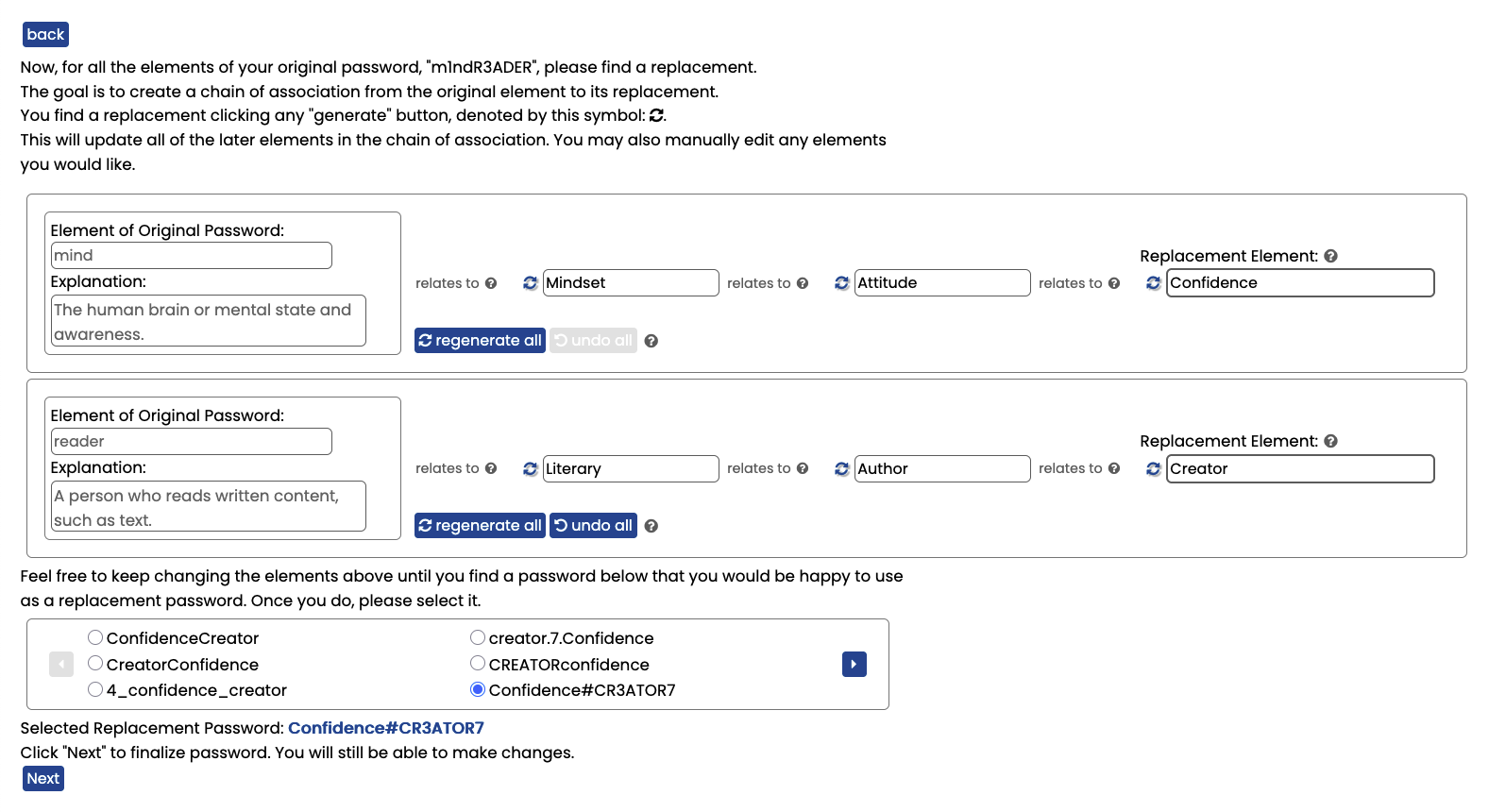
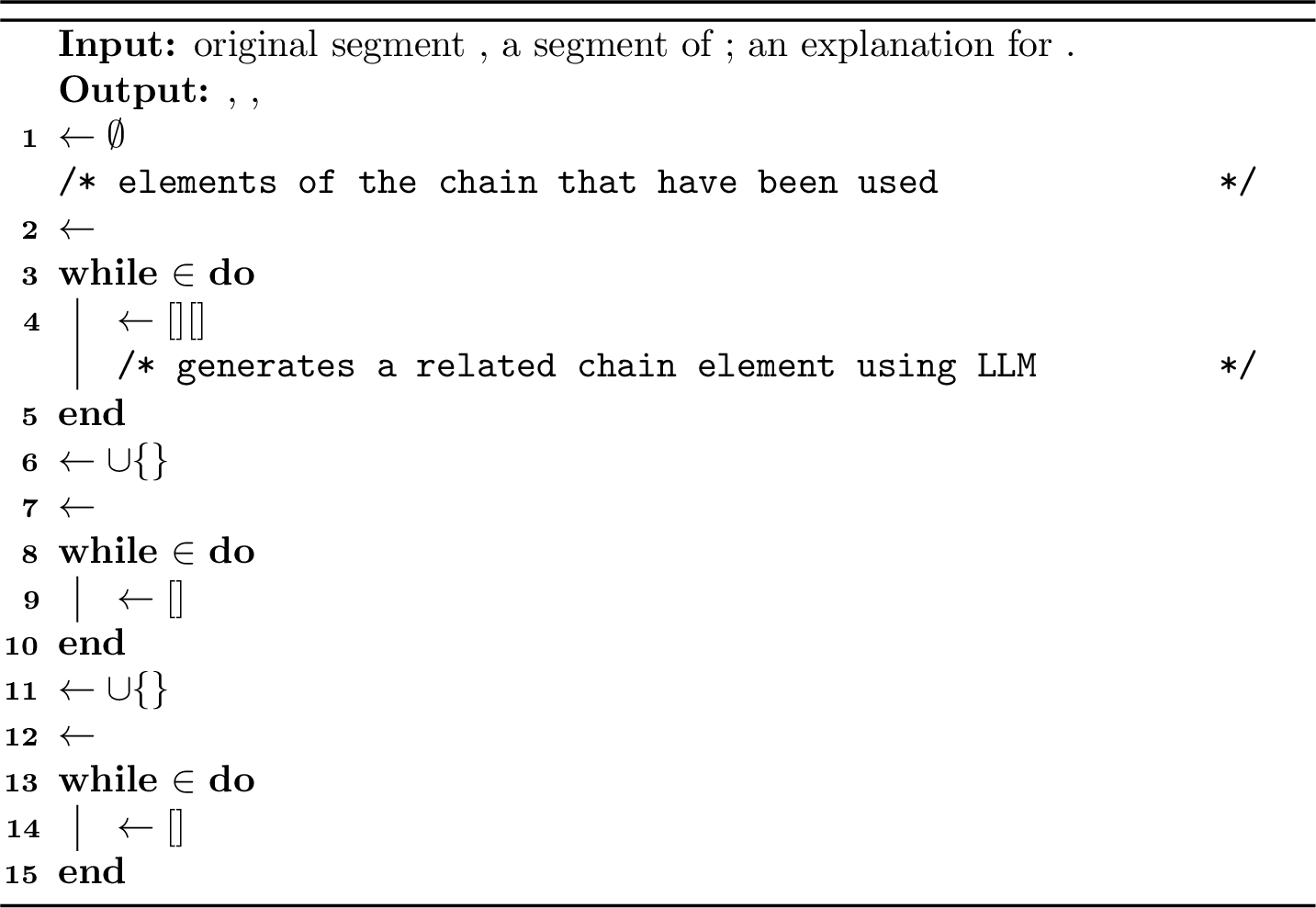
Once the segmentation is complete, each segment requires a replacement. Not all segments are necessarily used in every replacement password if the total length is sufficient, but we chose to set this requirement to ensure more variance in the resulting replacement passwords. However, if a user does not want a replacement for a given segment in their password, they can delete it in the previous step of password segmentation. A replacement is found by creating a chain of association: From the original segment and explanation, an associated string is generated. From that string, another associated string is found. Finally, the replacement segment is generated from this string. In the end, MindReader shows the original segment, two intermediate strings, and a replacement segment (the final element of the chain). This process is described in 3. The chain of association method was used to add variance to the replacement segment. A chain length of three was selected in order to make the resulting segment memorable, while adding variance.
MindReader also generates an explanation for the link between any two elements of the chain, in order to make the process easier to understand and interpret for users and increase memorability. This explanation is revealed in a pop-up to the user if the user hovers over the “relates to” connector between the elements (as shown in 21 (c)).
In 2, we show the segment replacement stage where all segments have been replaced. If a user would like to adjust the replacement for some segment, she can do one of the following:
Click “regenerate all”, which would replace all items in the chain of association for that segment. For example, if she clicked this button in the top row, “Mindset”, “Attitude”, and “Confidence” would all be replaced.
Click the regenerate button next to any element of the chain. This would cause that element and any later element to regenerate.
Edit any element in the chain. Every later element would be regenerated. For example, if she changed “Attitude” to “Thoughts”, the final element in the chain, “Confidence”, would be regenerated.
Edit the replacement element directly.
3.2.3 Password Creation↩︎
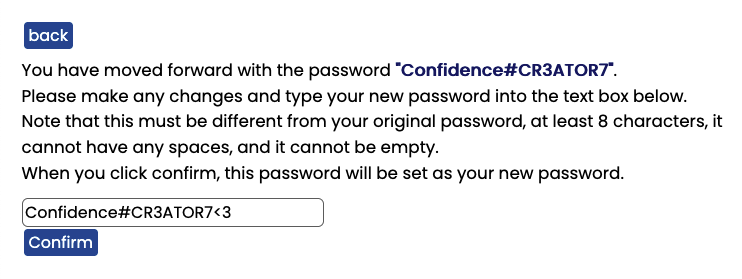
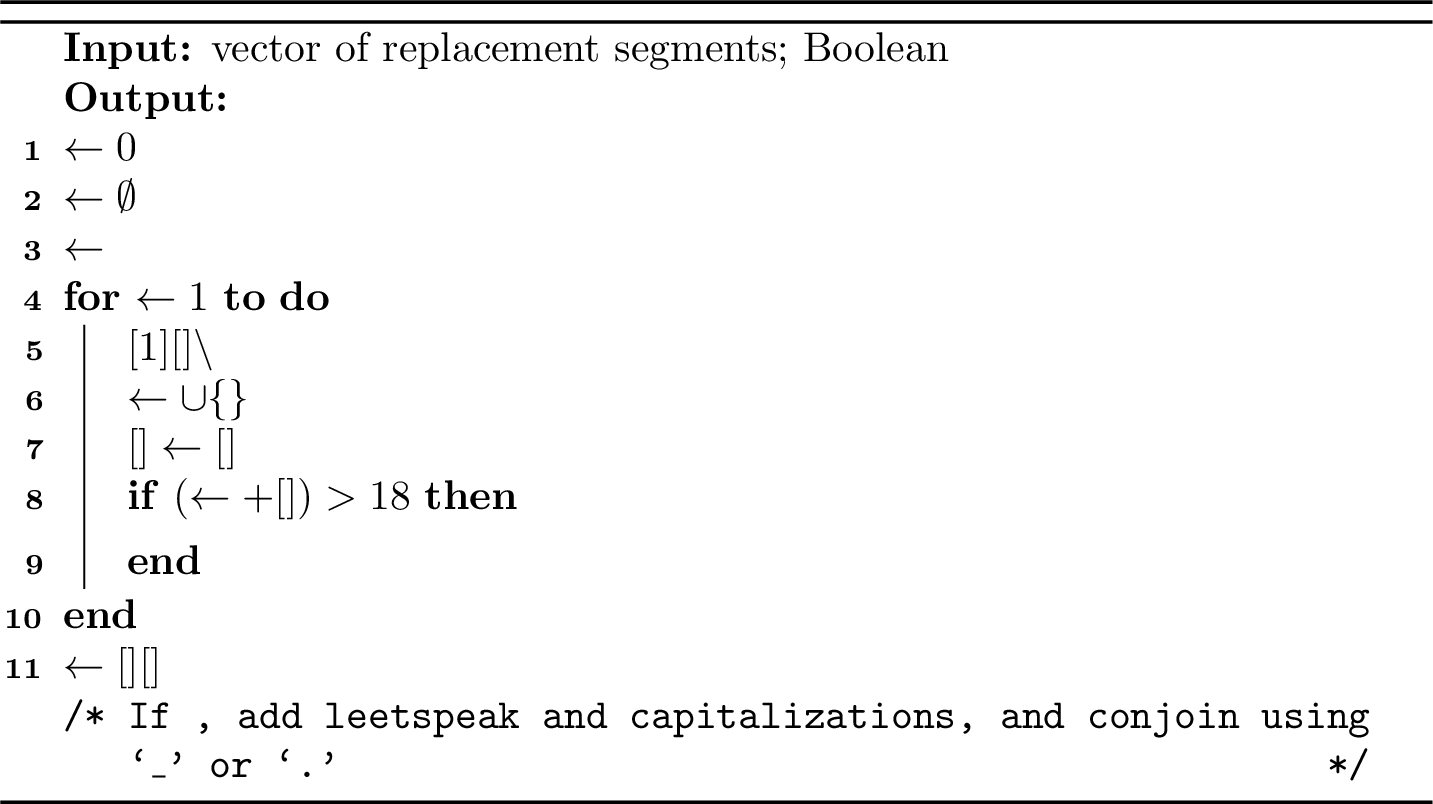
After replacing each segment of the original password, the replacement segments are combined into candidate replacement passwords. The process by which the replacement segments are chosen and ordered is shown in 5. The user is shown six candidates at a time, and more are generated as the user scrolls through sets of six. This is shown at the bottom of 2.
MindReader concatenates all or some of the replacement segments to create permutation passwords. To prevent the permutation passwords from being excessively long, we follow this process: If concatenating all segments results in a string less than 18 characters long, then this string is used as a permutation password. If concatenating all segments would result in a string of 18 or more characters, then we construct the permutation password by adding to it one segment at a time, and we stop the process as soon as we reach a length of 18 characters, potentially excluding some segments.
Additionally, candidate replacement passwords are generated using segment permutation and alterations. For these passwords, all or some replacement segments are again used, following the same length criteria as before. Each replacement segment is altered through randomized capitalization styles (lowercase, uppercase, or first character uppercase), as well as leetspeak-style character replacement. Random numbers or special characters are potentially added. Replacement segments and additions are combined either without separation through concatenation or with a joining character (a period or an underscore). Four out of the six suggested passwords in 2, including the selected password, are created with these alterations. While alterations made passwords more difficult to guess, we chose to allow users to select the simpler, permutation-only passwords if they preferred, since they were more directly drawn from the replacement segments.
The user selects a candidate replacement out of those shown. After selecting a replacement, the user is asked to type her final choice of password. She can either keep the chosen candidate unchanged or make adjustments. This step of the process is shown in 4.
Each step of the process is completed with user confirmation and with an option for user input. The user has an option to accept the automatic completion of each step, to make the tool easier to use. However, while all steps could be done fully automatically, requiring user confirmation and allowing changes from the user allows the user to better understand how the replacement password was created (with the goal of increasing memorability), allows the user to select a password that better matches her mental model (with the goal of increasing memorability), and introduces additional variance to the replacement password (with the goal of increasing security).
3.3 Implementation↩︎
We hosted MindReader as a web application on our institution-controlled server. The web application used the Django framework. We used two large language models throughout the process, both Llama models. For time-sensitive responses we used Llama 3.2 with 3 billion parameters (“Llama-3.2-3B-Instruct”), and for the rest we used Llama 3.1 with 8 billion parameters (“Llama-3.1-8B-Instruct”). Both models were instruction-tuned and downloaded from their official repositories on HuggingFace. They were run on the same institution-controlled server that hosted the web application.
4 User Study↩︎
To evaluate MindReader, we conducted a user study that was approved by our Institutional Review Board. We acknowledge that IRB approval is not necessarily sufficient to ensure principles of ethical research are followed, so we discuss how we set out to follow these principles in the user study in 9.1 and our ethical considerations in general in 9. We recruited participants from Prolific with a gender-balanced sample. The only requirement for this study was fluency in English. Fully informed consent was obtained from all participants at the start of the user study. Before returning to later stages of the study, users were provided access to the consent form for review.
4.1 User Study Protocol↩︎
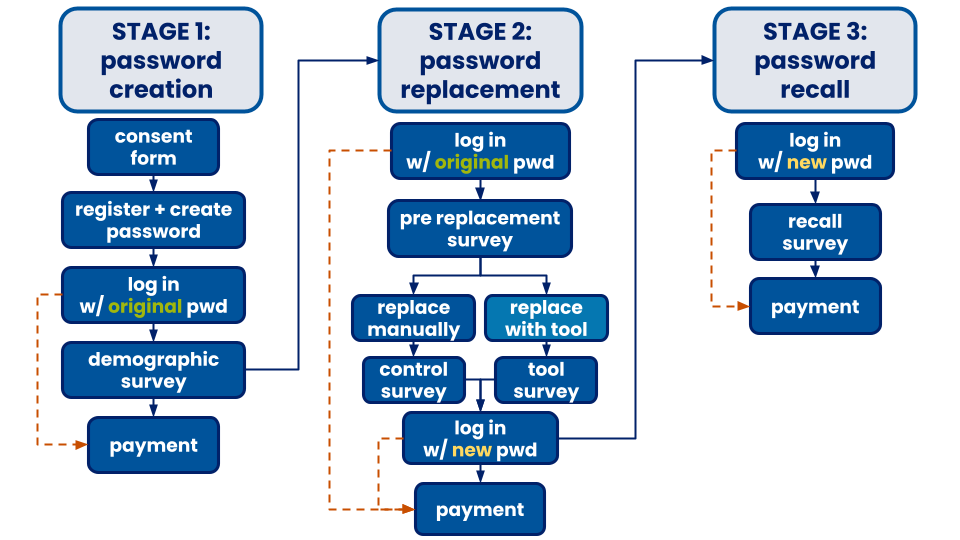
We had two groups, which differed only for Stage 2. We used Qualtrics for any surveys and the consent form. All survey questions are included in 11.1 and participant demographics are included in 11.2.
4.1.1 Stage 1: Password Creation↩︎
In Stage 1, users were recruited to the study. They filled out the consent form and were then directed to our website. They were reminded of the process for the first stage.
Users registered for accounts using their Prolific IDs, so we could ensure payment, and passwords of their choice. The password was required to be at least eight characters in length and have no spaces. Other than that, there were no restrictions. Users had to enter their password on two separate fields during registration. After registering, users were prompted to log in.
If users were unable to log in after five attempts, users were returned to Prolific and paid. After logging in, users were taken to a demographic survey. After the survey, participants were returned to Prolific and compensated. The compensation for this stage was $1.
4.1.2 Stage 2: Password Replacement↩︎
A week after the first stage, participants from Stage 1 who were able to successfully complete the entire process were invited back for Stage 2. We follow the example set in previous work [34], [35], where password recall is measured a week after password creation1. As with Stage 1, users were reminded of what the process for the stage would be, and were provided with a link to a copy of the consent form.
In Stage 2, participants were asked to log back in with the password created in the previous stage. If users failed to log in after five attempts, they were returned to Prolific and compensated.
If users were successful, they were taken to a survey. Participants were asked whether they wrote their password down the previous week, whether they typed their password or used copy-paste or autocomplete, and questions about how they came up with their password. After the survey, participants were told to replace their password as if it had expired (see 19 (c)).
One group of participants replaced their password without assistance, which we refer to as manual replacement. We refer to these passwords as control passwords. The only additional restrictions on the new password were that of the old password and the requirement that the new password be different. After manually replacing their password, users were asked what method they used in a survey.
The other group used the tool, as described in 3.2. We refer to this group as tool replacement. These passwords had the same requirements as the manually replaced passwords. After replacing their password with the tool, users were asked about their experience using the tool.
After completing the corresponding post-replacement survey, both groups were asked to log back in with their new password. If users failed after making five attempts, they were returned to Prolific and compensated. If users succeeded, they were also returned to Prolific and compensated.
Users in the control group were compensated $1. Users in the tool group were compensated $3. The difference in compensation was due to the additional time required for tool replacement, since users had to familiarize themselves with the tool.
4.1.3 Stage 3: Password Recall↩︎
A week after Stage 2, users who were able to complete the previous stage completely—replacing their passwords and logging back in at the end—were invited back for the final stage. Again, users were told the process for this stage and provided access to a copy of the consent form.
In this stage, users first needed to log in with the new password that they created the previous week. If users made five attempts and failed, they were returned to Prolific and compensated.
After logging back in, users were taken to a survey, where they were asked how they remembered and entered their password. After this, users were returned to Prolific and compensated. For this stage, users were compensated $1.
4.2 User Study Development↩︎
Before running our final study, we ran two pilot studies, both of which were fully IRB approved. The first pilot consisted of 106 participants and followed the same structure as the final study. This pilot used a previous version of MindReader, which differed in the segment replacement step. In that version, this step did not include a chain of association. We found that passwords created with the previous version of MindReader did not have the desired white-box security.
After implementing the chain of association to MindReader, we conducted a brief mini-pilot with 52 participants. In this mini-pilot, we aimed to confirm the usability of MindReader before the final study. This study had only one stage, in which users created and replaced their passwords. This stage was a combination of Stage 1 and 2, including only the demographic survey and post-replacement survey. Participants were compensated $3.
We do not report on the memorability, security, or usability results from either pilot study in this work.
4.3 User Study Summary↩︎
We ran our final study in two batches, which began about a month apart. For each batch, we recruited 100 participants. Half of each batch was assigned to the control group and the remaining half was in the tool group. From our user study, we collected 201 old passwords (due to an error, an additional participant was recruited), 61 control passwords, and 58 tool passwords.
5 Evaluation Methods↩︎
In this section, we describe how we evaluated MindReader. First, we discuss the black-box and white-box security of our passwords in 5.1 and 5.2. Then, we discuss our measurements for password memorability in 5.3. Finally, we cover how we measured the usability of MindReader and tool passwords in 5.4.
5.1 Black-Box Security↩︎
We separately analyzed the manually created (control) replacement passwords, the tool replacement passwords, and original passwords. For black-box security, we considered attacks where the attacker does not have knowledge of the user’s original password or of MindReader’s design.
Throughout the paper, we use guess estimates from Florêncio et al. [39] to differentiate online and offline attacks. We will refer to attacks up to \(10^7\) guesses as online attacks (\(10^7\) is an upper bound based on one guess per second for four months) and attacks up to \(10^{20}\) guesses as offline attacks (based on 1,000 machines computing hashes for a single account for four months). Other work uses thresholds such as \(10^5\), \(10^6\), \(10^{10}\), \(10^{12}\), and \(10^{14}\) [11], [12], [40], [41].
5.1.1 PGS↩︎
We used Carnegie Mellon University’s Password Guessability Service (PGS), which is available for researchers to use upon request, to evaluate the black-box security of passwords [42]. PGS provided us with the expected number of guesses necessary to crack a password with the following approaches:
Hashcat: Hashcat is a software tool that takes a word list (in this case, the “CMU wordlist”) and transforms the words to crack passwords.
John The Ripper (JTR): John the Ripper is a popular open source password hash cracking tool. It is able to match common password hashes in order to crack the plaintext passwords [43], [44]. It also uses a wordlist and word transformations.
Markov: PGS uses code from Ma, et al. [45]. The implementation used is a 5th-order Markov model.
Probabilistic Context-Free Grammar (PCFG): Weir, et al. first introduced using probabilistic context-free grammar for password cracking [46]. PCFG generates password guesses using context-free grammar and probabilities from a training set of existing passwords. This method has been shown to be more effective than John the Ripper [47]. The implementation used by PGS is developed by Komanduri [48].
Neural Network: The neural network approach is described by Melicher, et al. [49]. Neural networks can outperform Markov and PCFG, especially at high guess counts.
All methods but the last were evaluated by Ur, et al. [50].
We selected the ‘Length 8+’ password policy in PGS, as that was a requirement in our user study. We used the recommended option for all approaches. In our results, we report on the minimum number of guesses necessary to crack a password across the five approaches.
5.1.2 PassGPT↩︎
Alternative methods to crack a password have included training generative models, like a GAN (generative adversarial network) or LLM, where success is measured by the fraction of passwords generated in some number of guesses from a unique password test set [21], [51]. We used PassGPT [21], an LLM-based password generator, to see how many passwords were cracked, and the generation loss with PassGPT. We generated \(10^8\) passwords with PassGPT and calculated which fraction of original passwords, control passwords, and final tool passwords were guessed in some amount of guesses. Additionally, we calculated the total PassGPT loss over all passwords to estimate the likelihood they would be guessed, as many passwords were not guessed in \(10^8\) guesses.
5.2 White-Box Security↩︎
For white-box security, we considered an attacker who has knowledge of the old password, as well as full knowledge of MindReader, where applicable, and aims to learn the replacement password. We used the same guess cutoffs for online versus offline attacks as we did for black-box security.
First, we considered password overlap as in previous papers, as measured by consecutive character overlap. This is a proxy for how difficult a password would be to guess. In previous work, passwords overlapping in less than three consecutive characters were considered “completely dissimilar” [1].
Attacks have been developed to leverage a user’s password or passwords at other sites, measuring the similarity of a new password based on edit distance from a known password and edit probability and generating guesses with encoder-decoder models [52]–[55]. We used one of these methods, [54], to approximate the probability of guessing a replacement password given the original password.
Next, we aimed to more concretely evaluate how difficult it would be to crack the password. We used the best of the methods in 5.1.1, , and our own “knowledgeable attacker” strategy. This final strategy assumes the attacker has knowledge of (1) the password, (2) the user’s segmentation (but not the user’s explanations for the original segments), and (3) full knowledge of the tool implementation.
We combined all methods by choosing the minimum number of guesses required between methods (PGS, , and the knowledgeable attacker method described in 5.2.1 and 5.2.2). Since and the knowledgeable attacker strategy result in probabilities of guessing correctly, we took their inverse to get the expected number of guesses necessary.
5.2.1 Knowledgeable Attacker Strategy↩︎
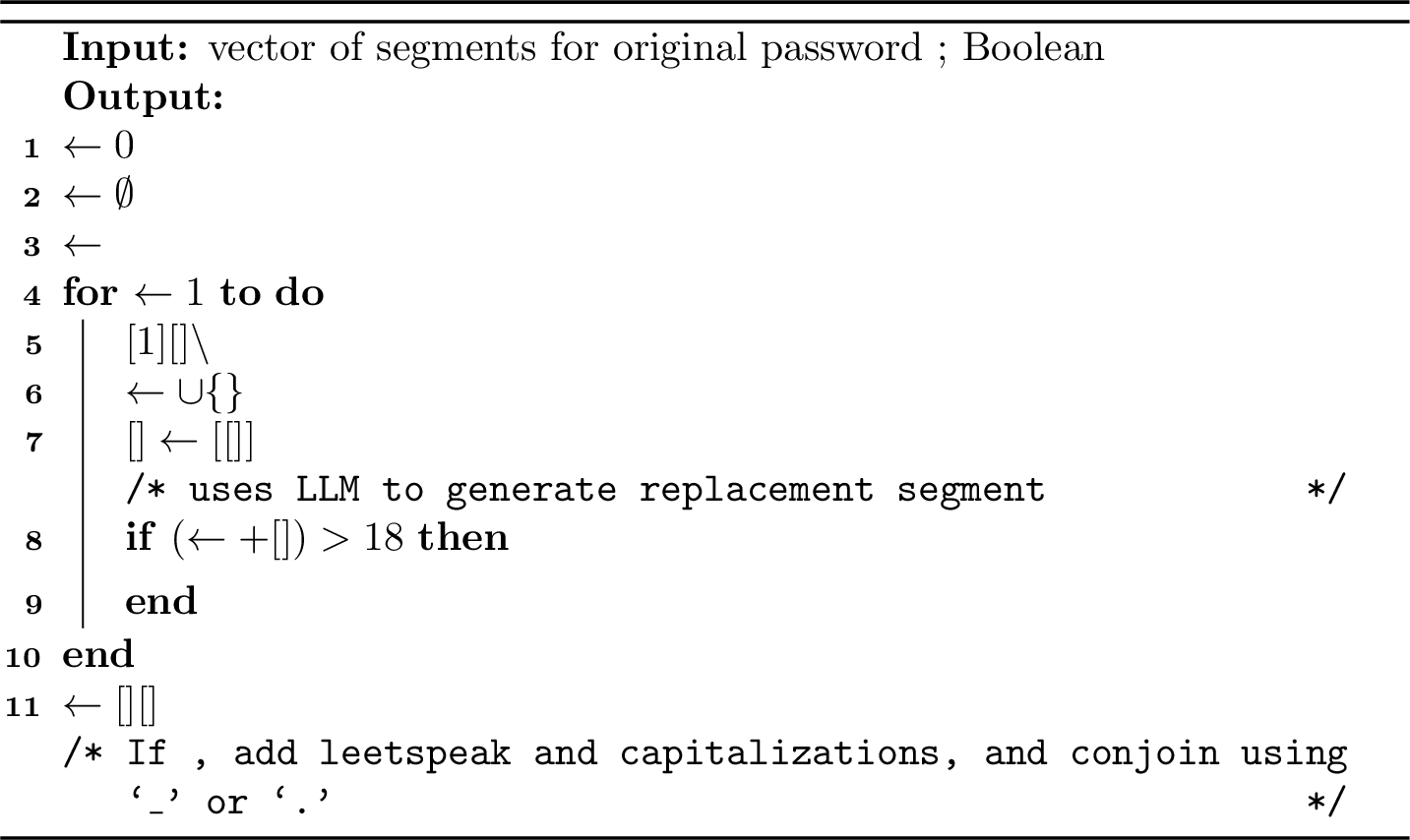
The adversary uses the method in 7 to try to guess the replacement password given the old password segmentation and knowledge of the tool.
We call the adversary’s guess \(\adversary[\origSegVec]\). We approximate the probability that the adversary guesses the password (i.e., \(\adversary[\origSegVec]=\newPwd\)) using \[\begin{align} \Pr(\adversary[\origSegVec] = \newPwd \mid \boolAlter) &= \sum_{\newSegVec} \Pr(\newSegVec \mid \origSegVec) \Pr(\newPwd \mid \newSegVec \wedge \boolAlter) \\ \Pr(\adversary[\origSegVec] = \newPwd \mid \neg \boolAlter) &= \sum_{\newSegVec} \Pr(\newSegVec \mid \origSegVec) \Pr(\newPwd \mid \newSegVec \wedge \neg\boolAlter) \end{align}\] where here, denotes the multiset as passed to .
We estimate \(\Pr(\newSegVec \mid \origSegVec)\) by invoking ] for each \(\segIdx \in \nats[1][\vecLen{\origSegVec}]\) repeatedly. Specifically, we invoke ] \(10{,}000\) times and set \(\Pr(\newSegVec[\segIdx] \mid \origSegVec[\segIdx])\) to be the fraction of these attempts that yielded . For any value that is never output, we set \(\Pr(\newSegVec[\segIdx] \mid \origSegVec[\segIdx])\) to \(1/10{,}001\). This means that we conservatively assume that each new segment is guessed from the corresponding old segment in the next try. Finally, we set \(\Pr(\newSegVec \mid \origSegVec) \gets \prod_{\segIdx\in\nats[1][\vecLen{\origSegVec}]} \Pr(\newSegVec[\segIdx] \mid \origSegVec[\segIdx])\).
We calculate \(\Pr(\newPwd \mid \newSegVec \wedge \boolAlter)\) and \(\Pr(\newPwd \mid \newSegVec \wedge \neg\boolAlter)\) explicitly. Finally, we take \(\Pr(\boolAlter) = \Pr(\neg\boolAlter) = 1/2\), and put these values together to estimate \(\Pr(\adversary[\origSegVec]) = \newPwd\).
5.2.2 Final Replacement Password vs.Selected Replacement Password↩︎
In some cases, the final password used in the tool group is impossible to get using MindReader’s method of combining new segments. This could happen, for example, if the user adds more segments or if the user replaces characters in new segments in a way that we do not. The attacker can still guess the replacement password that was selected by the user, which must be possible to get with MindReader. We call this password , and we now write the probability that the attacker guesses a \(\finalPwd \not\in \mathop{\mathrm{supp}}{\adversary[\origSegVec]}\), where \(\mathop{\mathrm{supp}}(\adversary[\origSegVec])\) denotes the support of the distribution , as \[\begin{align}\\ & = \max_{\pwd\in \mathop{\mathrm{supp}}(\adversary[\origSegVec])} \Pr(\adversary[\origSegVec]=\pwd \wedge \PassToPath(\pwd)=\finalPwd) \\ & = \max_{\pwd\in \mathop{\mathrm{supp}}(\adversary[\origSegVec])} \Pr(\adversary[\origSegVec]=\pwd) \Pr(\PassToPath(\pwd)=\finalPwd) \\ & \approx \Pr(\adversary[\origSegVec]=\newPwd) \Pr(\PassToPath(\newPwd)=\finalPwd) \end{align}\] where denotes the password selected by the user before changing it into .
5.3 Memorability↩︎
We measured the time to log in, number of attempts, and ability to log in. There is one registration (during Stage 1), two logins with the original password (during Stages 1 and 2), and two logins with the replacement password (during Stages 2 and 3). We compared: the memorability of tool passwords during Stage 2 to control passwords during Stage 2 and original passwords during Stage 1 (immediately after passwords are created); and the memorability of tool passwords during Stage 3 to control passwords during Stage 3 and original passwords during Stage 2 (one week after the passwords were created).
We separately report results for our entire set of participants, our set of participants excluding those who either used auto-complete or pasted their passwords based on keystrokes, and our set of participants excluding those who used auto-complete, pasted their passwords, or self-reported writing down or pasting their passwords in our study.
5.4 Tool Usability↩︎
We evaluated the usability of MindReader itself in 5.4.1. We evaluated the usability of passwords created with MindReader by measuring the rates at which passwords were manually entered in 5.4.2 and login time in 5.4.3.
5.4.1 Tool Satisfaction↩︎
We evaluated participants’ satisfaction with MindReader with a survey, completed by participants in the tool group in Stage 2 of the study. Participants responded to the following questions with a 5-point Likert scale:
I would use a password created by this tool.
The tool was difficult to use.
The tool was fun to use.
The tool was intuitive to use.
We refer to these questions as ‘would use’, ‘difficult’, ‘fun’, ‘intuitive’ in 6.4.1, respectively.
5.4.2 Pasting Rates↩︎
For all login events mentioned in 5.3, we checked whether the user entered her password with auto-complete or by copy-pasting. We say the user used auto-complete if no keystrokes were recorded, and the user pasted her password if only one keystroke was recorded. In our analysis, we only considered the two categories: manually typed and pasted, which includes both copy-pasting and autocomplete.
5.4.3 Login Times↩︎
For all login events, we evaluated time it took to log in, excluding cases where users were unable to log in or pasted their passwords. We measured three types of time:
Overall Time: We measure time from the first password keystroke to the time the login was successful.
Typing Time: We measure time from the first password keystroke to the last keystroke. If the user made multiple attempts to log in, typing time is the time from the final, successful attempt.
Time-per-character: We report typing time divided by the number of characters in the password.
6 Results↩︎
This section mirrors the structure of 5. We begin by covering our results for password security: first black-box security in 6.1 and second white-box security in 6.2. We then cover password memorability in 6.3 and finish by covering usability in 6.4.
6.1 Black-Box Security↩︎
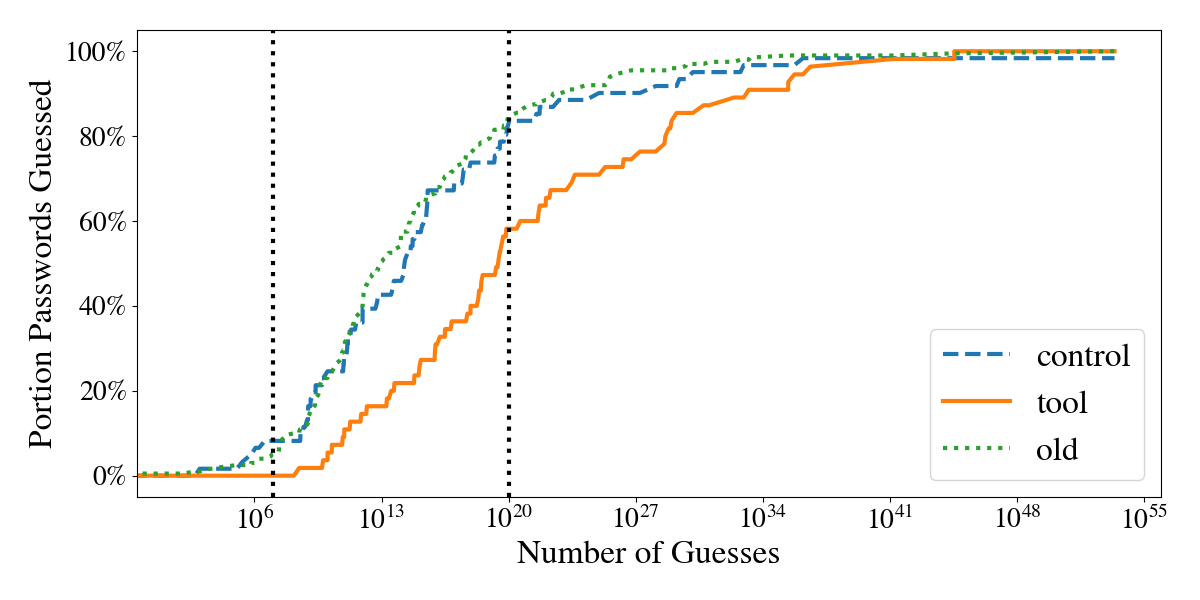
For every method of measuring black-box security we evaluated, tool passwords performed better than control passwords.
6.1.1 PGS↩︎
| online | offline | |||||
| old | control | tool | old | control | tool | |
| Hashcat | 0.04% | 0.03% | 0.00% | 21.50% | 19.67% | 3.64% |
| JTR | 0.04% | 0.03% | 0.00% | 31.50% | 32.79% | 7.27% |
| Markov | 0.04% | 0.03% | 0.00% | 13.50% | 9.84% | 5.45% |
| PCFG | 0.04% | 0.03% | 0.00% | 47.00% | 39.34% | 12.73% |
| Neural | 0.04% | 0.07% | 0.00% | 84.00% | 81.97% | 58.18% |
| Minimum | 0.05% | 0.08% | 0.00% | 84.00% | 81.97% | 58.18% |
Between PGS methods, tool passwords were always guessed later than control or original passwords. Original passwords and control passwords were generally comparable. The minimum number of guesses necessary to crack a password across all approaches is shown in 8, and portion of passwords guessed in online and offline attacks separated by approach are shown in 1.
Four passwords were not evaluated by PGS, since they contained non-ascii characters. One of them was an old password, and the rest were passwords created with the tool. These passwords are omitted from this analysis. Additionally, one password, from the control group replacement password set, was never guessed across approaches. We set the number of guesses for this password to the largest number of guesses seen across passwords, \(2\times 10^{53}\).
We examined whether the necessary log (base 10) number of guesses differed across groups (old, control, and tool passwords) with a one-way analysis of variance (ANOVA). We found a significant effect, \(F = 15.82, \pval < 10^{-7}\). We performed ad-hoc analysis with Tukey’s HSD, and found that the tool passwords were statistically different from both the old (mean difference 5.4 and \(\pval = 0.0004\)) and control (mean difference 6.4 and \(\pval < 10^{-7}\)) passwords. There was no statistical difference between the old and control group.
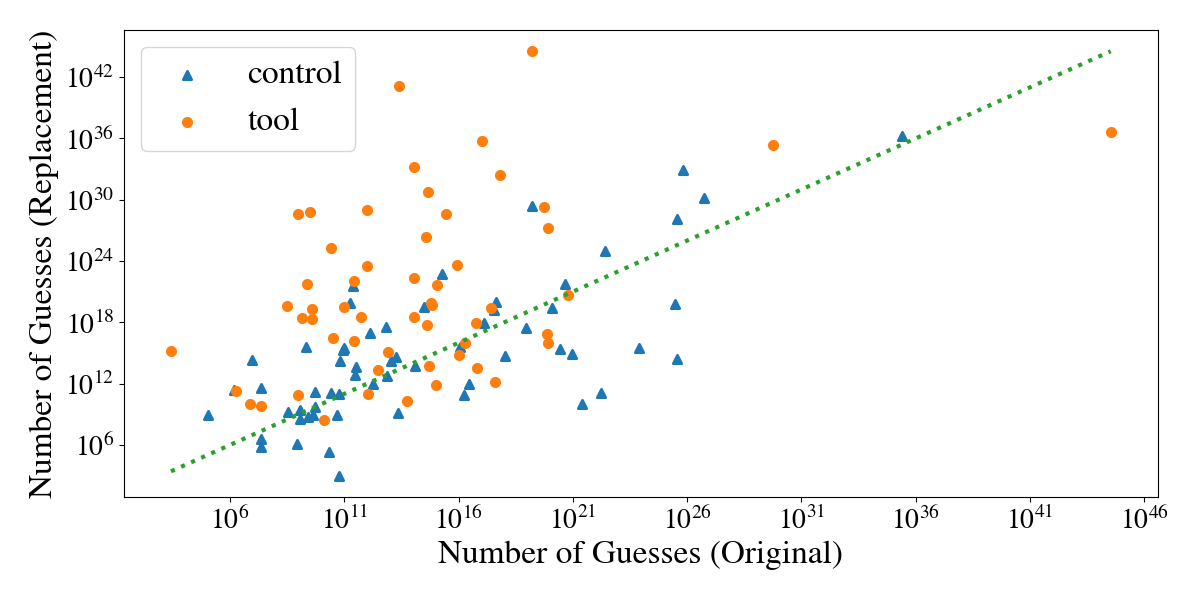
We also compared the change in security, as evaluated by PGS, between the old and replacement passwords. 9 compares the number of guesses required to guess the old password and the corresponding replacement. On average, control passwords took 2.2 times as long to guess as the original. Tool passwords, however, took \(10^{6.8} \times\) as long. 43.33% of control passwords were actually weaker—easier to guess—than the original password. For tool passwords, only 23.64% were easier to guess.
6.1.2 PassGPT↩︎
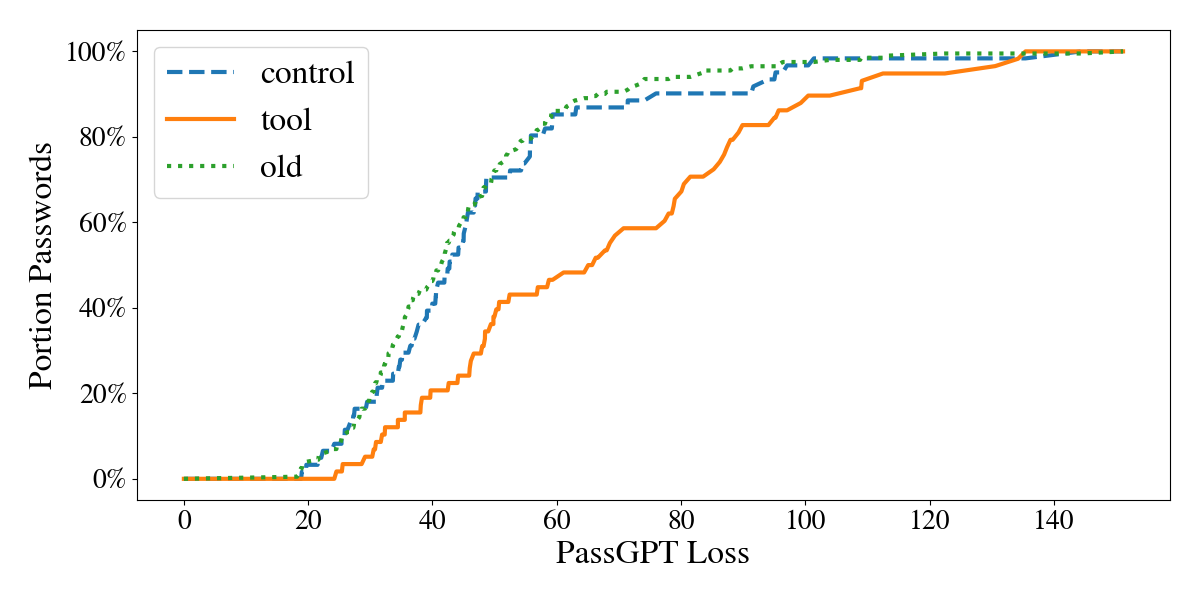
Most passwords were not guessed in the \(10^8\) PassGPT guesses we made. Only 9/201 old passwords were guessed and 4/61 control passwords were. No tool passwords were ever guessed.
Since so few passwords were guessed, we also measured PassGPT loss over all passwords, as seen in 10. Tool passwords consistently had higher loss than original or control passwords, indicating they were less likely to be generated by PassGPT. Control passwords had slightly higher loss than original passwords.
6.2 White-Box Security↩︎
6.2.1 Password Overlap↩︎
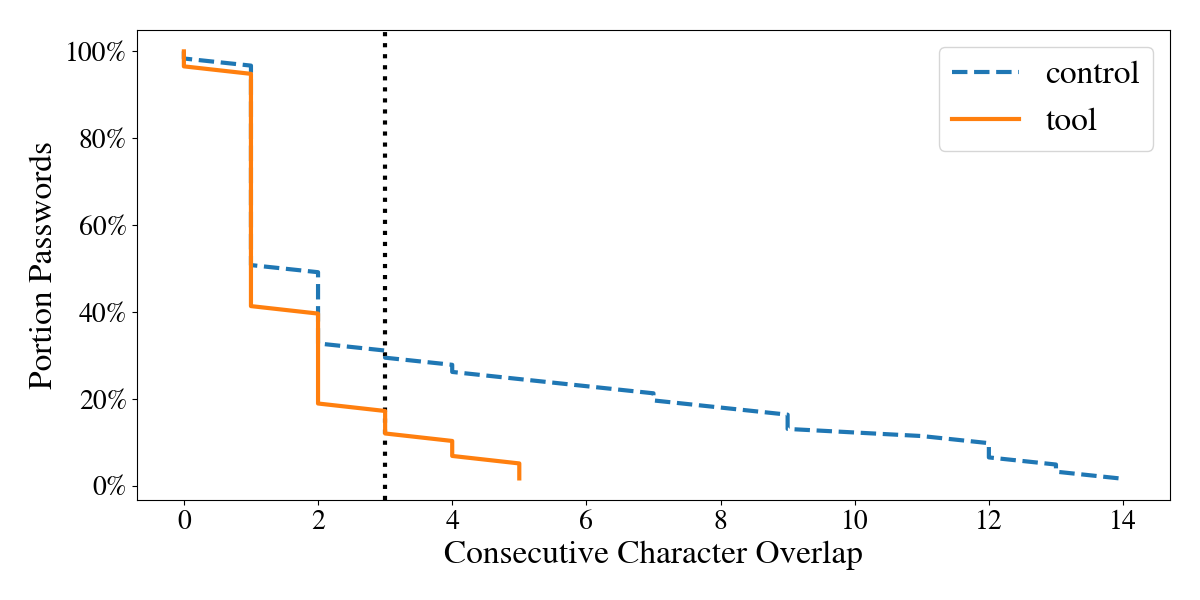
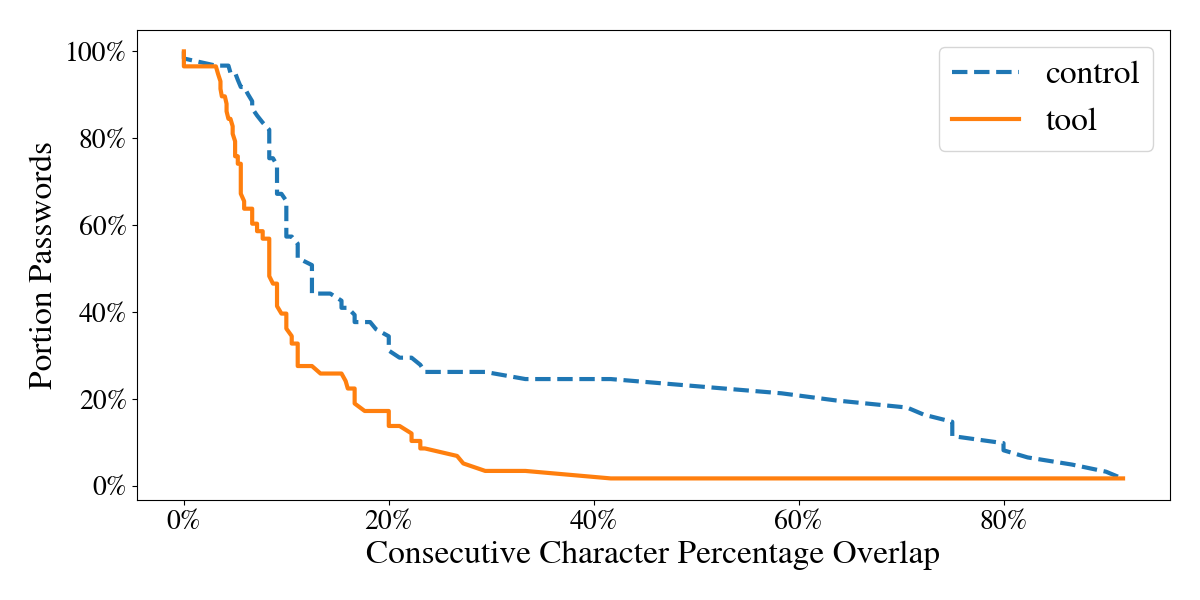
There was less consecutive character overlap in the tool passwords than the control passwords. If passwords with less than 3 character overlap are considered completely dissimilar, 69% of control passwords were completely dissimilar from the original, while 83% of tool passwords were completely dissimilar. All character overlap is shown in 11. Control passwords had, on average, 26% overlap with the original password. Tool passwords had average overlaps of 10%. Overlap percentages are shown in 12.
6.2.2 Best White-Box Guessing Probability↩︎
| portion guessed | average log guesses | ||||
| online | offline | online | offline | ||
| control | 18.03%\(^\dagger\) | 88.52% | 4.79\(^\ddagger\) | 11.60 | |
| tool | 3.45%\(^\dagger\) | 81.03% | 6.69\(^\ddagger\) | 11.68 | |
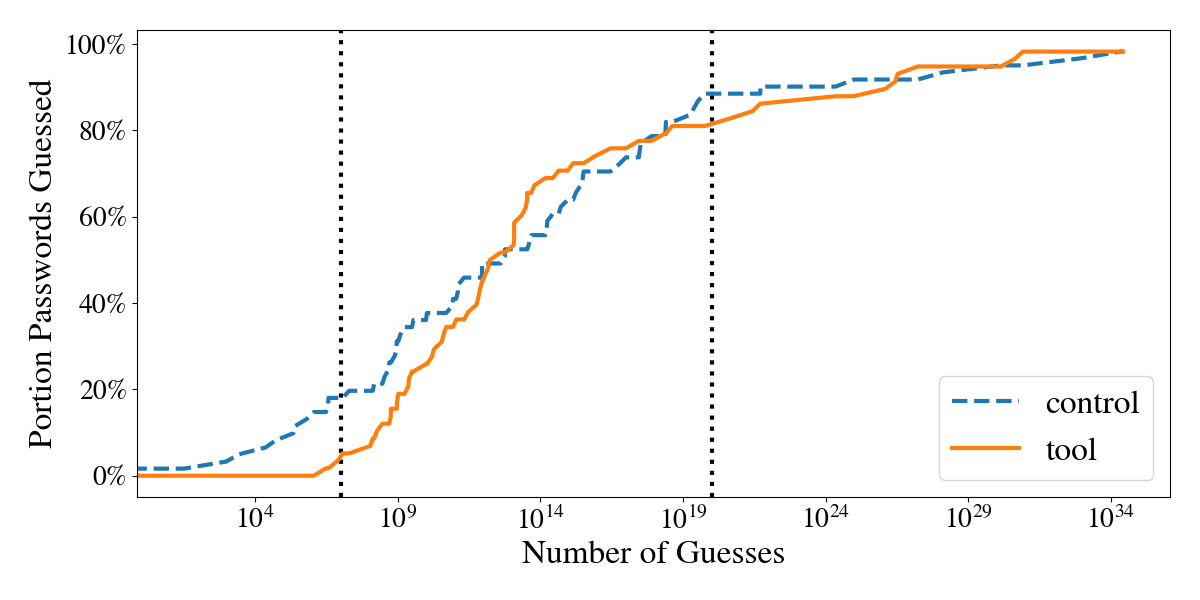
Control passwords were easier to guess than the tool passwords by a white-box attacker (even though the white-box attacker had three strategies for tool passwords—PGS, , and the knowledgeable strategy—but only two strategies for control passwords). 13 shows the probability of guessing tool and control passwords, given knowledge of the original password and MindReader. 49/58 of tool passwords were guessed first by an attacker cracking the password with knowledge of the tool. 1/58 of these passwords were guessed first with Pass2Path. The rest were guessed first using PGS, without knowledge of the original password. 16/61 of control passwords were first guessed with Pass2Path. The remainder were guessed first with PGS. We did not attack control passwords with an attacker with knowledge of the tool.
For online attacks, 3.45% of tool passwords compared to 18.03% of control passwords were guessed. We used a one-tailed Mann-Whitney U test which showed statistical significance (\(\pval = 0.0056\), \(U = 2027.0 < \ucrit \approx 2078\)). We compared the average log guesses necessary for those passwords guessed in an online attack. We used Welch’s t-test, since the variance differed between groups, and found that this difference was statistically significant (\(\pval = 0.0044\)). However, for offline attacks, there was not a statistically significant difference (\(\pval > 0.1\)). All results are shown in 2.
6.3 Memorability↩︎
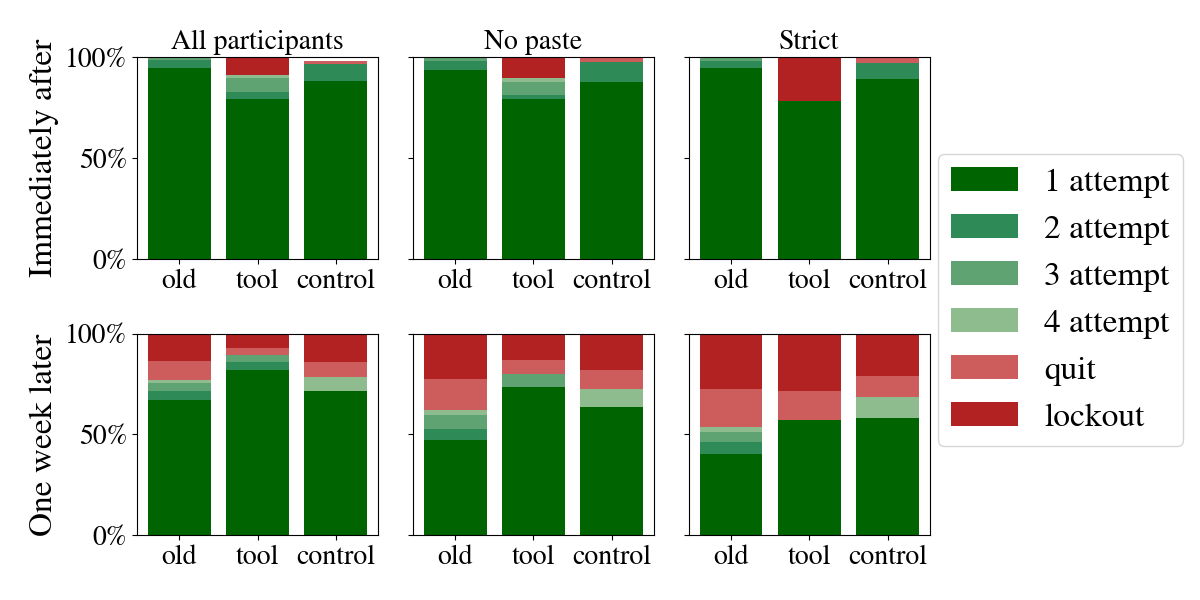
We show success rates for all password types, login times, and exclusion criteria in 14.
Immediately after password creation, users who created MindReader passwords had the lowest login success rate out of all password types with all exclusion criteria. This difference was statistically significant (\(\pval < 0.05\) between MindReader and control passwords for all participants and excluding those based on keystrokes, and \(\pval < 0.005\) for all other comparisons with MindReader passwords) as analyzed with post-hoc Dunn with Bonferroni p-value adjustment. One week later, the best performing group was either the control group, with the strict exclusion criteria, or MindReader group, for the other two exclusion criteria. The difference between any groups one week later was not statistically significant. We compare our results to those of related work in 7.1.
6.4 Tool Usability↩︎
6.4.1 Tool Satisfaction↩︎
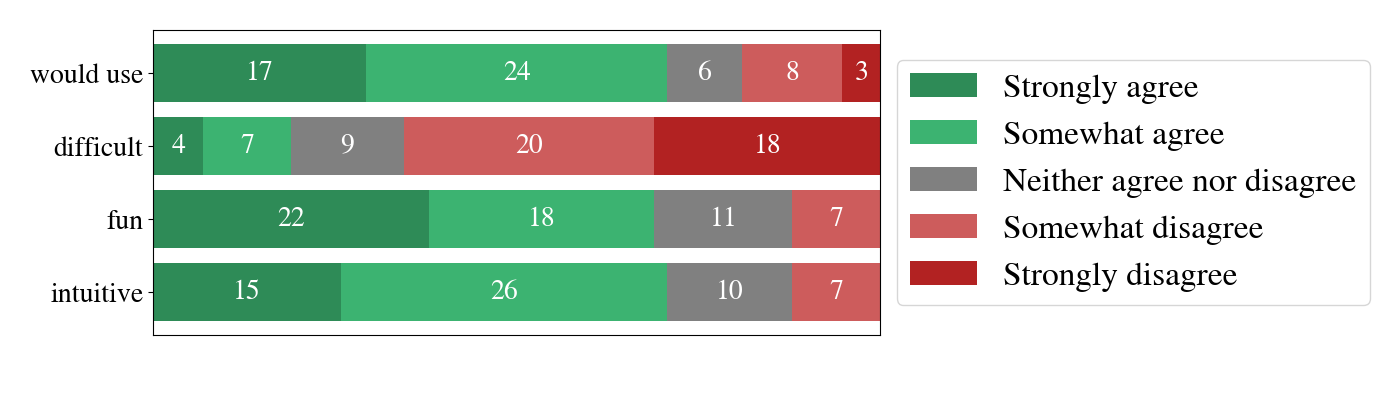
Around 70% of users agreed that the tool was intuitive and fun to use and said they would use the tool, and less than 20% disagreed for those same questions. 18.97% said that the tool was difficult to use, and 65.52% disagreed. Exact numbers are shown in 15.
6.4.2 Pasting Rates↩︎
| password type | immediately after | one week later |
|---|---|---|
| registration | 3.48% | - |
| old | 18.00% | 51.22% |
| control | 16.95% | 27.27% |
| tool | 16.99% | 52.00% |
We compared how many participants, out of those who successfully logged in, typed their password in manually and how many pasted their password. Immediately after creating the password, about 83% of both tool and control passwords and 82% of old passwords were manually typed in, as shown in 3. A week later, however, about half of tool and old passwords were typed in, but 72.73% of control passwords were. More passwords were manually typed immediately after creating them than a week later, across password types.
We compared pasting rates across password types at the same login time: this meant we compared old passwords at Stage 1 with tool and control passwords at Stage 2 (“immediately after” category), and we separately compared old passwords at Stage 2 with tool and control passwords at Stage 3 (“one week later” category). A Kruskal-Wallis test showed no statistically significant difference (\(\pval > 0.1\)) between password types both immediately after passwords were created and a week later.
6.4.3 Login Times↩︎
| overall | typing time | time/char | |
|---|---|---|---|
| immediately after | |||
| old | 12.92 | 5.75 | 0.51 |
| control | 11.24 | 5.71 | 0.50 |
| tool | 62.52 | 12.57 | 0.78 |
| one week later | |||
| old | 40.65 | 19.03 | 1.74 |
| control | 25.13 | 7.00 | 0.60 |
| tool | 38.16 | 16.28 | 0.77 |
Average overall time, typing time, and time-per-character are shown in 4. We found that overall time and typing time increased a week after the passwords were created.
There was one outlier for old passwords a week later that took significantly longer than other cases, over 10 minutes. Without this outlier, the overall time became 29.72s, typing time became 7.9s, and time per character became 0.72s.
We performed Welch’s ANOVA on typing time between old, control, and tool passwords immediately after and one week later. We found no statistically significant difference one week later. Immediately after, we found a statistical effect with \(\pval=0.0006\). We performed ad-hoc analysis with Tukey’s HSD and found a statistically significant difference (\(\pval < 10^{-6}\)) between both the tool and control and tool and old passwords. This was expected, as the typing time for the tool group was much longer.
7 Discussion↩︎
In this section, we first compare the security and memorability results of MindReader to past works (7.1). Then, we describe the implications of MindReader and how well it can apply to real-world use cases (7.2), as well as the ways in which our results may be limited (7.3).
None
Figure 16: Comparison of password recall for MindReader and previous work. Results also shown in 6. x-values are slightly adjusted for visibility. Our passwords are tested at the same time or later than most comparisons and showed comparable recall rates at the same time..
None
Figure 17: Comparison of password recall, security, and user difficulty for MindReader(7-day recall circular markers) and [11] (2-5 day recall). For [11] triangular markers, only the Carnegie Mellon blocklist was used. For the other markers, composition requirements (number of character types and minimum length) were used. The color of these markers corresponds to the minimum length. User difficulty for MindReader control and old passwords uses the difficulty found by [11] for users who created passwords of at least length 8 and 1 character type. Fewer MindReader passwords were guessed than most points of comparison. Fewer participants found MindReader difficult to use than any other password type..
7.1 Comparison to Previous Work↩︎
We begin by comparing the memorability results of MindReader to those of related work on passwords or passphrases. All points of comparison for password recall are shown in 6. Password recall is often measured at less than 7 days past password creation [11], [12], [24], [36]–[38], but some other papers also use 7 days as the period of check-in [34], [35] and [35] is notable for measuring password recall at 28 days past password creation. Related work generally excludes data for users who are measured to paste their password in or report copying it in [11], [12], [34]–[38] or asks participants to not write the passwords down [24]. A limit of five attempts is commonly used [11], [12], [35]–[38], with some exceptions [24], [34].
We present how MindReader passwords compare in recall and recall time to these works in 16. Out of papers that report memorability for all participants, without the exclusion of users who pasted their password, MindReader had the highest password memorability of 89.29%, compared to 74.38-82.96% [37] and 87.30% [36]. Among participants who did not paste or write down their password previously, MindReader passwords had 57.14% recall, compared to 35.00-89.00% in related works [11], [24], [37] at \(< 7\) days and 57.28% for the only other work that reports memorability at 7 days [35].
| similar password | same method | new method | other | |
| total count | 30 | 69 | 24 | 3 |
| I used multiple words | 6 | 17 | 9 | 0 |
| I used the abbreviation of a phrase or an abbreviation of multiple words | 5 | 10 | 0 | 0 |
| I used a single word. | 6 | 8 | 4 | 1 |
| I replaced characters with similar ones (e.g. replacing “I” with “1”) | 3 | 13 | 0 | 0 |
| I added random numbers. | 8 | 21 | 9 | 0 |
| I used only numbers. | 1 | 0 | 0 | 0 |
| The entire password was random characters. | 4 | 14 | 5 | 2 |
| I used personal information, like a name or year. | 13 | 17 | 5 | 1 |
| None of the above (please specify) | 3 | 9 | 2 | 1 |
Next, we compare password security to two other works that use PGS to measure password guessability, those being [38] and [11]. These papers generally report guessability up to \(10^{14}\) guesses. At \(10^{14}\) guesses, 21.82% of MindReader passwords are guessed with PGS, based on the minimum guess number between all methods. [11] reports on 25 password types. Out of these, three have a smaller proportion guessed at \(10^{14}\) guesses. All of these have a neural network strength requirement—guaranteeing that none of them are estimated to be guessed in \(10^6\), \(10^{10}\), or \(10^{12}\) guesses. Additionally, for all three types, at least 38% of participants reported password creation to be annoying and at least 28% found it difficult. By comparison, 19% of our participants found using MindReader difficult, and 25% of participants in [11] found creating a password with the only requirement being a minimum length of eight characters (the same as the old and manually replaced passwords in our study) difficult. For [38], two password types explored out of 15 have fewer passwords guessed in \(10^{14}\). Both of these require passwords with three character types, 12 total characters, and show a strict password strength bar. [11] also reports portion of passwords guessed at \(10^{6}\) guesses. For two password types, no passwords are cracked. For the remaining types, between 0.03 and 6.3% are guessed. No MindReader passwords are guessed at \(10^{7}\) guesses. We show a comparison of memorability and security between [11] and MindReader in 17, as well as a comparison of security and user difficulty.
7.2 Real-World Applicability↩︎
MindReader is not necessarily the best solution for all users who need to replace their passwords. For example, users who already use securely generated passwords and auto-fill their passwords would not benefit from the memorability or security of MindReader passwords.
However, we believe a large fraction of users would benefit, including password-manager users for the passwords that they do not auto-fill (e.g., to their password manager). Of the participants who completed the pre-replacement survey (see 11.1.2), a majority (69/126) reported that they replaced their passwords using the same method that they usually use to create their original passwords. Another 30 participants used “a password similar to an existing password”. These users’ results are of interest to us, since this indicates the realism of their results when using MindReader. Of both of those groups, only 18 said the entire password was random but 23 said they used multiple words, 14 said they used a single word, and 30 said they used personal information, all of which result in passwords that can be made more secure by MindReader. This suggests that there are indeed real-world users who would benefit from MindReader. More results from the pre-replacement survey are shown in 5.
7.3 Limitations↩︎
7.3.0.1 Ecological validity
We measured the security and memorability of MindReader passwords through a user study. Although we followed best practices in password research [36], participants in our study had different incentives than real users and so the passwords participants created in our study may have different characteristics than real passwords.
We measured memorability only immediately after password creation and a week later, and so our results may not generalize to passwords used more often or for longer periods of time.
Additionally, we were not able to evaluate MindReader passwords in the context of a user managing a set of passwords. While our methodology is standard practice in password research (c.f., [11], [12], [24], [34], [35], [37], [38]), evaluations along the lines of Vu et al. [56] would provide additional context.
7.3.0.2 Sample size
We found that MindReader passwords were statistically significantly stronger than original passwords and control-condition replacements against a black-box attacker and against a white-box attacker in online attacks. However, we did not find a statistically significant difference for offline white-box attacks, or for memorability for return logins, pasting rates, or login times immediately after creation. A larger sample could potentially lead to statistically significant results for those comparisons.
Additionally, we found a statistically significant difference showing that MindReader passwords were slightly less memorable and took slightly longer to type immediately after they were created. We believe that these results are less important when it comes to long-term usability of MindReader passwords than results on logins that take place a week later; nonetheless, these results indicate that there may be opportunity to further improve MindReader so that it outperforms traditional password replacement even more comprehensively.
8 Conclusion↩︎
We introduced MindReader, a tool and method for helping users replace their passwords. Through a user study, we studied the passwords that participants created both with and without MindReader. Participants who used MindReader were generally satisfied: a majority said they would use it and that it was fun and intuitive; a minority said it was difficult to use. We found that passwords created with MindReader were more secure against a traditional attacker than manually replaced passwords in both the online and the offline settings. Moreover, passwords created with MindReader were also more secure than those created without it by an online attacker with knowledge of both the original password and MindReader’s design. Finally, passwords created with MindReader were comparably memorable to those created without it when users returned to log in.
9 Ethical Considerations↩︎
We identify three main categories of potential stakeholders impacted by this research: user study participants (9.1), victims of password leaks (9.2), and potential users of MindReader(9.3).
9.1 User Study Participants↩︎
The main concern for harms that can affect participants is violation of privacy. We mitigated any potential harm to participants in the following ways. In our user study, we did not collect any direct identifiers about our participants. The only indirect identifiers we collected—age and technological proficiency—were collected as they could be relevant to this research. We did so to minimize the risk of participants being identified. We asked participants to not use any passwords that they use for any real world account, whether in the past or present. Nonetheless, the passwords used may have been similar to a real-world password, so we do not release the passwords used.
We also maintained respect for our participants’ personhood through informed consent, repeated reminders and availability of information for the user study procedure and purpose, and allowing users to discontinue their participation at any point. Users were paid separately for each stage and therefore not penalized if they did not want to participate in later stages.
A user study was necessary to appropriately evaluate the effectiveness of MindReader. We believe we were able to maintain ethical principles in our human subjects research and appropriately mitigate any harm to participants in a way that justifies our work on MindReader.
9.2 Password Breach Victims↩︎
While we only tested MindReader with passwords that were voluntarily provided (either through our own informal testing or the user study) and not used for real-world accounts, real-world passwords from password breaches were used in developing some of the security evaluation methods used in this paper.
Building on research that has used stolen passwords means that our work benefits from the violation of these victims’ privacy, even if neither our work nor the work we built on caused these violations. To mitigate any additional harm and prevent further privacy violation to victims, we did not publicize or mention the exact breaches these passwords originated from.
Ultimately, we believe that using these datasets in a research capacity to evaluate MindReader is justifiable. These datasets already exist and are available publicly, and using methods informed by these datasets to evaluate MindReader password security provides us more informed and more accurate estimations for security, especially against attackers who also take advantage of these breaches.
9.3 Potential MindReader Users and Society at Large↩︎
The final potential stakeholder affected by this research is users of MindReader and society at large if MindReader were to be implemented outside of a research context. A key risk of using MindReader is an attacker who takes advantage of her knowledge of the tool to crack passwords of MindReader users. We evaluate this risk in 6.2 and take care to iterate the design of MindReader to be resilient against this attack, mitigating the risk of privacy violation if a MindReader password were to be guessed. We also acknowledge that, while we found that MindReader passwords were more resilient to these online attacks than other passwords, we did not find statistically significant improvement for offline attacks and attacks in general. We therefore emphasize the need for further research before widespread usage of MindReader.
We also acknowledge a potential risk in the usage of MindReader—that is that passwords, or at the very least password segments, need to be available in plaintext in order to find replacements. An appropriate deployment would address this risk. MindReader may need to be implemented so it can be run locally or accessed through a trusted party. However, these details on the real-world deployment of MindReader are outside the scope of this work.
Appendix↩︎
| recall rate (%) \(\uparrow\) | |||||||||
| password [+citation] | password type | time frame | no paste or self-report | no paste | no self-report | all | attempts | ||
| MindReader | password | 7 days | 57.14 | 80.00 | 70.00 | 89.29 | 5 | ||
| Control | 68.42 | 72.73 | 68.42 | 78.57 | |||||
| Original | 53.75 | 61.86 | 59.34 | 76.88 | |||||
| [11] | passwords | 2-5 days | 66-86 | ? | |||||
| [37] | passwords | 52.00-65.00 | 74.38-80.94 | 5 | |||||
| [37] | passphrases | 35.00-57.00 | 65.51-82.96 | 5 | |||||
| [24] (LLM) | passphrase | 1 hour | 32.14-37.50 | 1 | |||||
| 1 day | 14.29 | ||||||||
| 3 days | 0.00 | ||||||||
| [24] (Random-Word) | passphrase | 1 hour | 17.86-37.50 | 1 | |||||
| 1 day | 17.86 | ||||||||
| 3 days | 0.00 | ||||||||
| [38] | password | 2 days | 78.20 | 5 | |||||
| [12] | 2 days | 77.00-89.00 | |||||||
| [36] | 2-5 days | 84.90 | 87.30 | ||||||
| [35] | password | 7 days | 57.28 | 5 | |||||
| 28 days | 48.54 | ||||||||
| [34] (control) | password | 7 days | 47.73 | 3 | |||||
| [34] (loci) | 63.64 | ||||||||
| [34] (link) | 86.37 | ||||||||

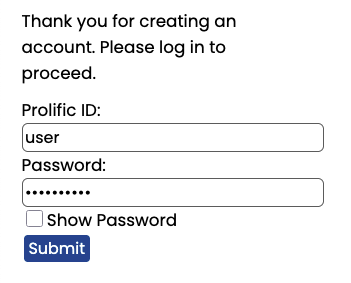
Figure 18: Samples of the MindReader UI during stage 1. a — A summary of the current stage shown to participants before beginning stage 1 of the study., b — MindReader’s registration page, c — Login page, shown immediately after registering before the first login event.
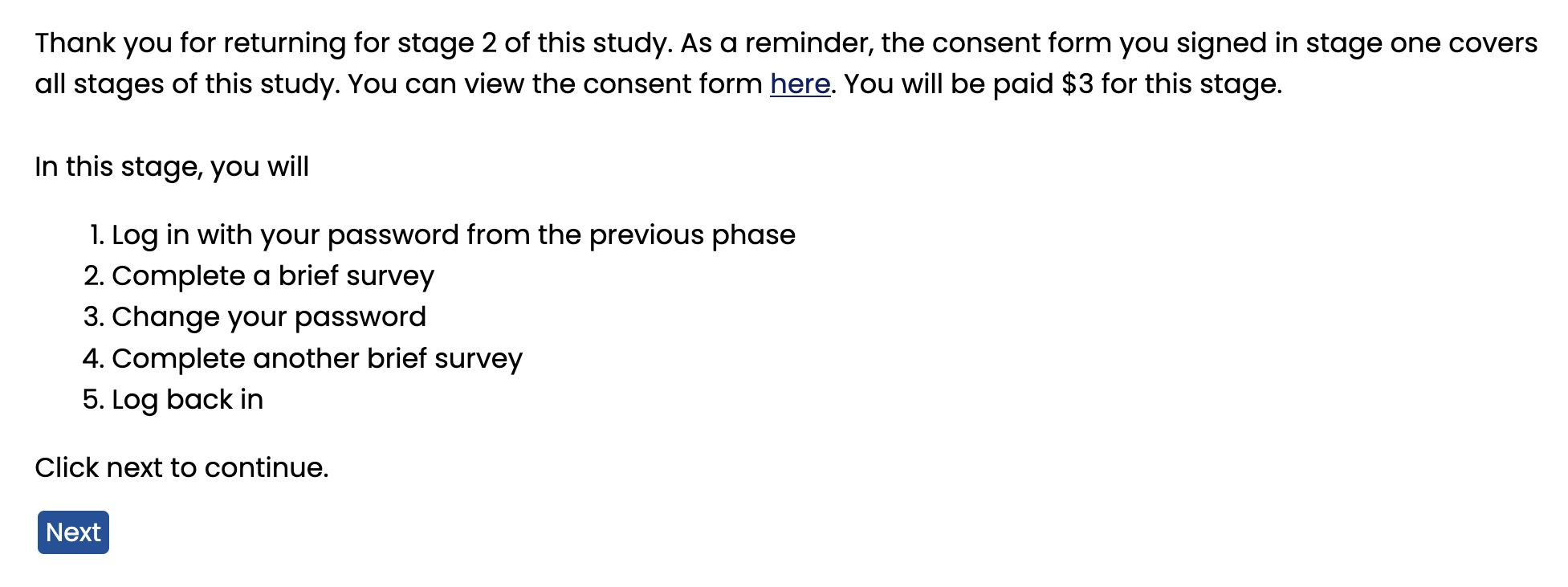
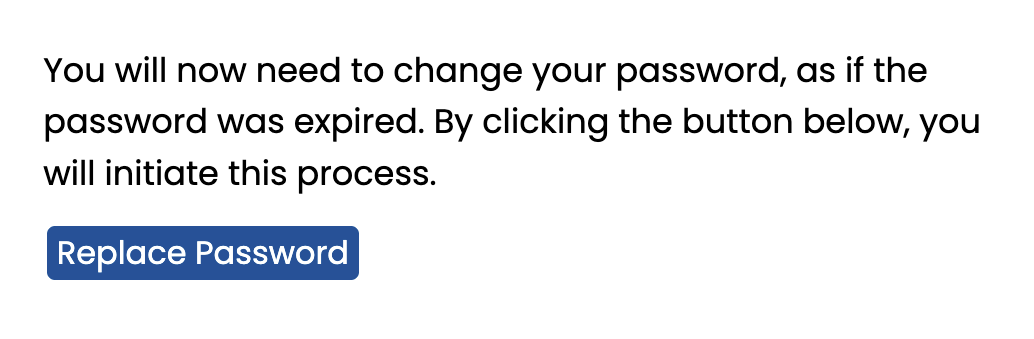
Figure 19: Samples of the MindReader UI during stage 2, not shown in 3.2. a — An introduction shown to users right before stage 2 of the study. This screenshot shows the view for the tool group. Control group participants see a different compensation value. A link to the consent form is available., b — The login page shown to users in stage 2 of the study., c — Information shown to users right before they replace their password. Participants in the tool group are shown 1 next.
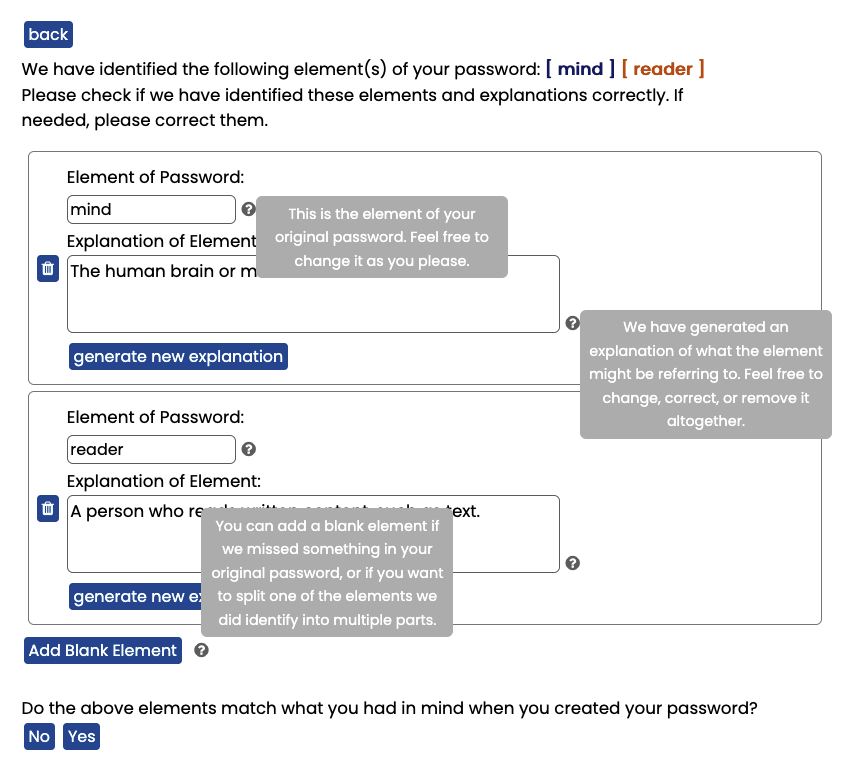
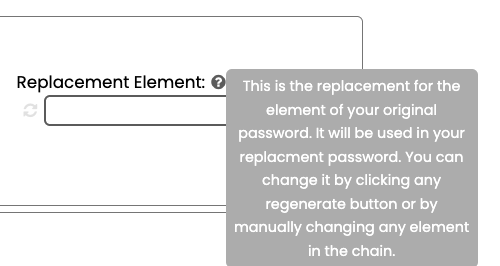
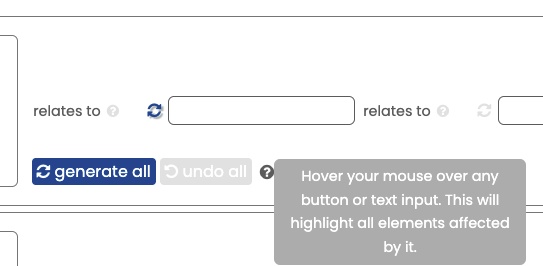
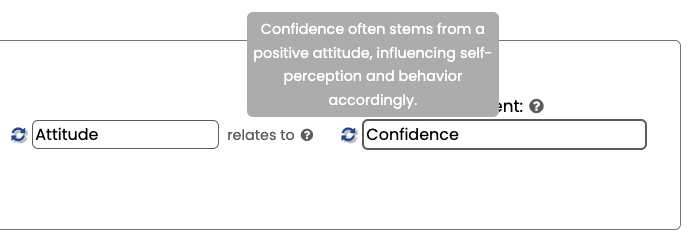
Figure 21: Samples of tooltips from the segment replacement step. a — Tooltip next to the segment replacement step, b — Tooltip next to the control buttons for each segment, c — A tooltip explaining the connection between two links in the chain of association.
10 Tool Details↩︎
| use-case | prompt |
|---|---|
| confirming if leetspeak was used | “Is the passphrase ‘{pwd}’ written in leetspeak? Respond in one word, just ‘yes’ or ‘no’.” |
| removing leetspeak | “Remove the leetspeak from this password, when appropriate: ‘{pwd}’. Return the password, and nothing else.” |
| generating segment explanation | “What might ‘{segment}’ be referring to? Respond with just the answer, under 10 words.” |
| default prompt for getting next element in chain | “For a user that has {elem} in their password, what is a closely related string that they can use instead? Return one word, and nothing else.” |
| alternative prompts for getting next element in chain | “For a user that has {elem} in their password, what is a similar word that they can use instead?” |
| “What is a word or string related to {elem}?” | |
| “What is the first word that you think of when you hear {elem}?” | |
| + “Return one word, and nothing else.” (added to all prompts in this category) | |
| generating connections between two chain elements | “What is a simple but truthful and fact-based connection between {item1} and {item2}? Respond with at most 15 words.” |
10.1 Tool UI↩︎
In this section, we provide views of the MindReader UI not shown in 3.2. These are separated by stage. Views from stage 1 are shown in 18 and feature the introduction page, registration, and login pages. Views from stage 2 are shown in 19, and include the introduction, login, and pre-replacement page that informs users they will need to replace their passwords.
We also show example tooltips, which are visible while hovered over, with additional information for the users in 20 and 21.
10.2 Prompts↩︎
We specifically provide prompts used by MindReader in 7.
11 User Study↩︎
In this section, we provide all user study material used (11.1) and provide compiled information for the demographic data collected (11.2).
11.1 User Study Survey Questions↩︎
11.1.1 Demographics Replacement Survey↩︎
This survey was taken by participants during stage 1 after they completed the consent form, registered for an account, and logged in with their newly created password. After this survey, participants were done with stage 1.
Select what applies in relation to your experience with password managers:
I am not familiar with password managers.
I am familiar with password managers, but I do not use them.
I am familiar with password managers, and I use them.
Other (please specify): (text entry)
How frequently do you give computer or technology advice (e.g., to friends, family, or colleagues)?
Daily
A few times a week
A few times a month
Rarely
Never
Which of the following best describes your educational background or job field?
I have an education in, or work in, the field of computer science, engineering or IT
I do not have an education in, or work in, the field of computer science, engineering or IT
Select your age group:
18-24
25-34
35-44
45-54
55-64
65+
11.1.2 Pre-Password Replacement Survey↩︎
This survey was taken by participants during stage 2 after they logged in with their password from the previous week (original password). After this survey, participants replaced their password.
Did you write down your password in order to remember it? This will not affect your compensation.
No
Yes
Did you copy your password in? This will not affect your compensation.
Yes—I typed it in manually from a reference
Yes—I used copy/paste or autocomplete
No—I typed it in from memory
Which of the following best describes the method you used to come up with your original password, in comparison to other passwords you have used?
I used a password similar to an existing password.
I used a completely new password, but used a similar method to what I normally do.
I used a completely different password, and I used a method I do not normally use.
Other (please specify): (text entry)
Which of the following describes the method you used to come up with your original password? Select all that apply.
I used the abbreviation of a phrase/multiple words.
I used a combination of a phrase or multiple words.
I used a single word.
I replaced characters with similar ones (e.g. replacing “I” with “1”)
I added random numbers.
I used only numbers.
The entire password was random characters.
I used personal information, like a name or year.
None of the above (please specify): (text entry)
Feel free to provide any additional information on how you came up with your original password. (text entry)
11.1.3 Pre-Password Replacement Survey (Control)↩︎
This survey was taken by participants in the control group during stage 2 after they replaced their password. After this survey, participants were directed to log in with their new password.
Which of the following most closely describes your method for replacing your password?
I used my old password, and made minimal changes.
I came up with my new password using my old password, but the passwords themselves are distinct.
My new password is not related to my old password, but I used the same logic or method to come up with both.
My new password is not related to my old password, and I used different logic or method to come up with them.
Other (please specify): (text entry)
Feel free to provide any additional information on how you came up with your replacement password. (text entry)
11.1.4 Pre-Password Replacement Survey (Tool)↩︎
This survey was taken by participants in the tool group during stage 2 after they replaced their password with MindReader. After this survey, participants were directed to log in with their new password.
The tool was intuitive to use. (strongly agree to strongly disagree, 5 point scale)
The tool was fun to use. (strongly agree to strongly disagree, 5 point scale)
The tool was difficult to use. (strongly agree to strongly disagree, 5 point scale)
I would use a password created by this tool. (strongly agree to strongly disagree, 5 point scale)
Please describe any difficulties you had with this tool. (text entry box)
Feel free to provide any more information on how you came up with your replacement password using the tool. (text entry)
11.1.5 Recall Survey↩︎
This survey was taken by participants in the control group during stage 3 after they logged back in with their replacement password. After this survey, participants were done with the study.
Did you write down your new password in order to remember it? This will not affect your compensation.
No
Yes
Did you copy your new password in? This will not affect your compensation.
Yes—I typed it in manually from a reference
Yes—I used copy/paste or autocomplete
No—I typed it in from memory
11.2 User Study Demographics↩︎
| Question | Response | Count | |
|---|---|---|---|
| Are you familiar | Yes, and I use them. | 131 | |
| with password | Yes, but I do not use them. | 54 | |
| managers? | No. | 15 | |
| How frequently | Rarely | 53 | |
| do you give computer | A few times a month | 68 | |
| or technology advice | Daily | 23 | |
| (e.g., to friends, | A few times a week | 54 | |
| family, or colleagues)? | Never | 2 | |
| Do you have an education | No | 121 | |
| in, or work in, the field | |||
| of computer science, | Yes | 79 | |
| engineering or IT? | |||
| Select your age group | 25-34 | 78 | |
| 18-24 | 31 | ||
| 45-54 | 26 | ||
| 35-44 | 47 | ||
| 55-64 | 13 | ||
| 65+ | 5 |
We provide user responses to demographic questions from 11.1.1 in 8. Participants varied in age but were most likely to be 25-34 years old, mostly did not have a background in computer science, engineering, or IT, and most reported that they use password managers.